Legal Opus USPTO Trademark Search
USPTO Trademark Search Tool
Find relevant trademark IDs and classes by describing your product or service in plain English.
Use this free USPTO trademark search tool to translate everyday descriptions into official ID Manual categories. No signup required.
See It In Action
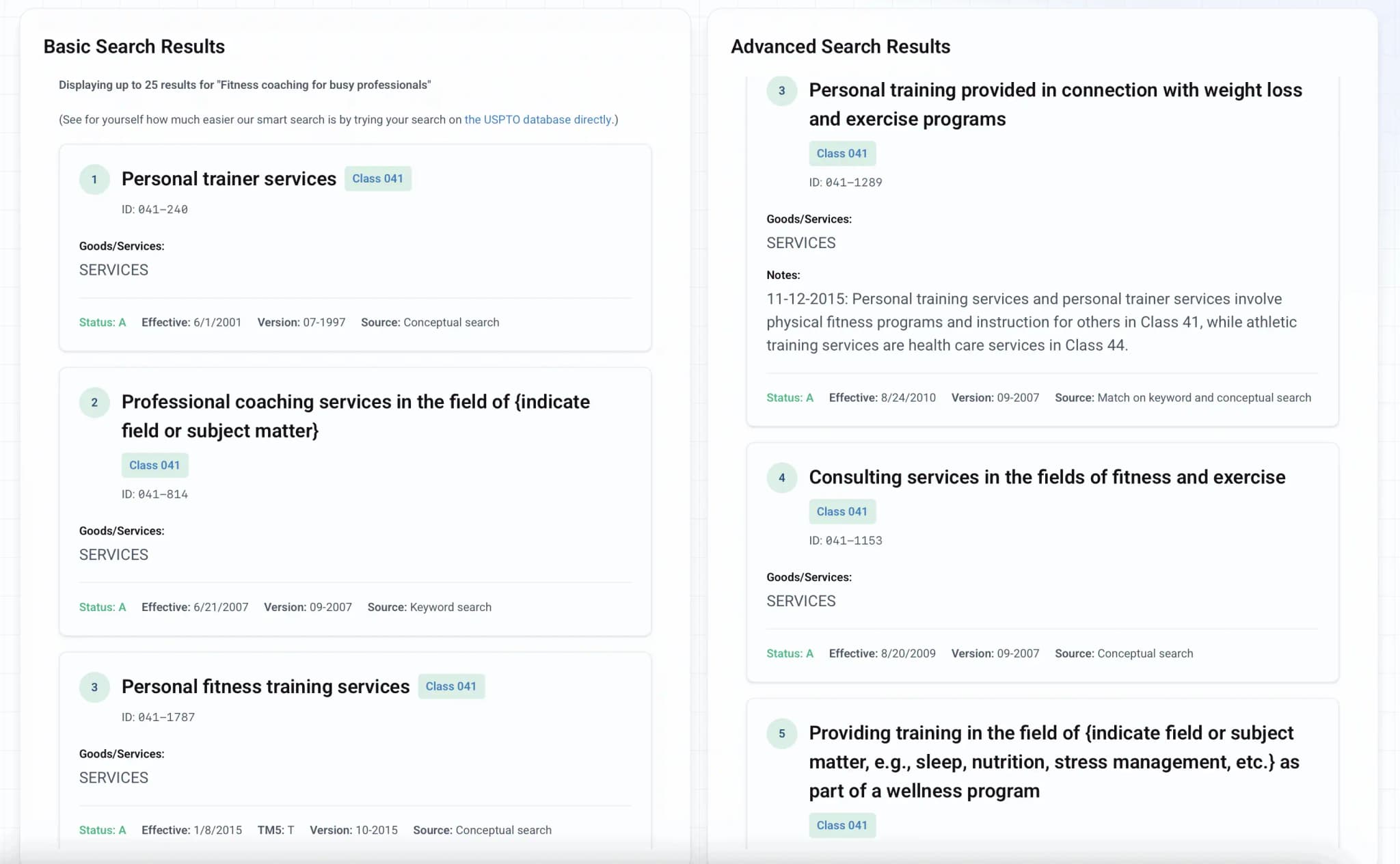
1A business owner wants to identify USPTO classes for a service like "Fitness Coach for Busy Professionals."
2They can find relevant trademark IDs and USPTO classes in seconds by describing the service in Legal Opus' trademark search.
Compare this to the USPTO's standard search tool, which may miss useful results when a query does not match the government wording exactly.
Legal Opus searches for the underlying concept, not just the exact words.
Why This USPTO Trademark Search Tool Works
The USPTO ID Manual contains over 70,000 goods and services descriptions written in technical language. Legal Opus translates everyday product or service descriptions into relevant trademark IDs and classes you can review.
Search by Concept, Not Guesswork.
Traditionally, search depends on exact wording. If you do not type the government's exact term, useful categories can stay hidden. Legal Opus scans related concepts so you can find stronger starting points for your trademark class search.
Find Classes Before You File.
Describe what your business sells or does, then review related USPTO trademark IDs and classes in one place. Compare this to other tools, where most people try several keyword combinations before anything useful appears.
Learn the Official Terms.
Each result includes the trademark category, class number, and goods or services description, so you have useful reference language when you file in the official USPTO system.
How to Search for USPTO Trademark Classes
1.
Describe Your Product or Service
Type what your business sells or does in plain English. For example: "mobile app for fitness tracking," "organic coffee beans," or "consulting for restaurant owners."
2.
Match Against USPTO Categories
The tool compares your description with USPTO ID Manual categories using keyword and concept-based search.
3.
Select Relevant Trademark IDs and Classes
Browse matching trademark ID categories with their class IDs, goods and services descriptions, and official wording to compare.
Common Questions
Is it free to search for USPTO trademarks?
Yes. The USPTO's standard Trademark Search system and ID Manual are free to use. Our tool is also free and does not require signup; it helps you search ID Manual categories more easily than standard search tools.
How do I search for a trademark name?
Searching for a trademark name is different than searching for the trademark ID (also known as the trademark category), which is what this tool focuses on. To search existing trademark names, use the USPTO's official Trademark Search database.
Sharing Brand Plans? Put the NDA in Writing.
A trademark ID search often happens before a launch, contractor brief, investor call, or partnership conversation.
If you are sharing a product name, business plan, code, financials, or creative work, Legal Opus has a Non-Disclosure Agreement template for use across the United States. It covers confidentiality obligations, permitted disclosures, and more. $14.99, no subscription.
NDA Template for Business Conversations
Use it before discussing a startup idea, product roadmap, contractor project, or sensitive business information.
Flat Per-Document Pricing
Pay once for the document you need. The NDA is $14.99, with no monthly plan to cancel.
Browse the Full Catalog
Find NDAs, lease agreements, LLC documents, divorce forms, wills, and other professional-quality templates.